Gadgets: Home backup system
Published in Science & Technology News
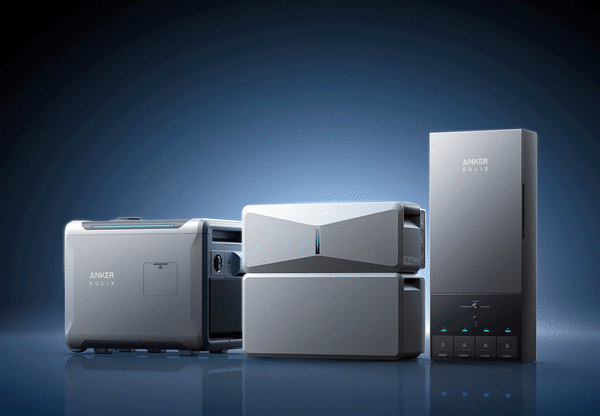
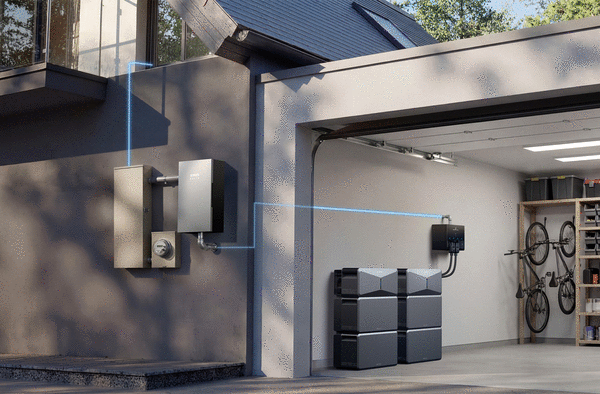
The Anker Solix E10 Home Backup System is one of those things you hope you never need, but if the power goes out, you'll be glad you have it. It keeps the lights on, your refrigerator running, and your home warm in the winter or cool in the summer. It's the kind of peace of mind that's hard to put a price on until you actually need it.
We all consider power outages at home annoying, and they never come at a good time. Sometimes they aren’t totally unexpected, for example, when a hurricane or other weather-related storms are in your area. So choosing the right system for your home, based on what you want to power and your budget, is a critical step.
The Anker Solix E10 Home Backup System is multi-component, making it customizable to what you want to power during an outage. This is not a do-it-yourself system, since it involves power, reconfiguring fuse boxes, and the like. Unless you're a professional electrician, I highly recommend hiring a professional to install it.
First, figure out what you want to power. The electrician I spoke with explained it perfectly: You have this many amps in your home, and with the Anker Solix E10 (in the configuration) you're getting will power this many. So you have to pick and choose the essentials you want. Think of what's important: heat, air conditioning, and appliances. In winter, it's critical to keep your pool filter from freezing.
It starts with a Smart Inlet Box or an Anker Solix Power Dock, and then the battery system.
The Smart Inlet Box works as a straightforward connection hub designed for a single E10 unit. During a blackout, you can quickly flip a switch on your panel to activate backup power.
In contrast, the Anker Solix Power Dock is a fully automated smart panel built to expand to support up to three E10 units. The Power Dock automatically switches over during a power outage for a seamless connection. It features 12 smart circuits for app-based load management and requires a more complex installation that combines your two existing electrical panels.
Then you add the Anker Solix E10 Power Module and battery packs. The Power Module works as the inverter and charger controller. For the batteries, true to the word, more is better. With the Smart Inlet Box, you can add up to 5 battery packs for a total of 30kWh. The Solix Power Dock can support up to three Power Modules and 15 battery packs, for a total of 90kWh.
One of my first questions was, once the system is chosen, installed, and ready, how long does it hold a charge sitting unused? An Anker representative said if it's fully shut down for a very long time at 50% charge, which is how it arrives, it'll still hold about 40% after a year in storage. With a powered-on 1 Power Module and a 2-battery setup, it would run for roughly 200 hours just sitting there.
He also added this about the life and keeping the batteries healthy: The E10 uses LFP cells rated for 4,000 life cycles at 80% capacity retention. LFP batteries also degrade slightly faster when sitting unused than when cycled regularly (calendar aging). So the best thing to do is keep them charged, and if it's purely for backup, try to cycle them about once a week.
With the Anker app, you can configure settings, including how much reserve power you have and how the batteries charge. Since you can’t plan on a power outage, keeping them charged and ready is critical. Other charging options include solar or a portable generator.
During installation, you and the electrician choose what you want to power the backup system with. Each of your home's choices is assigned to a circuit within the Smart Inlet Box or Anker Solix Power Dock and shown in the app. With the Power Dock, you can name each circuit to its specific assignment and turn it on or off as needed.
There are several ways to keep it powered up and ready at all times. The best way is to keep it connected to your home's electrical system so it stays topped off. Or you can connect solar panels or a portable generator. But once the power goes out and the backup system starts, it needs power to keep running for the duration of the outage, which is typically unknown.
You can power the backup system during a blackout with solar or a generator, both of which work well. Solar is ideal for cost, but it won’t charge nearly as fast as a generator. Anker has portable solar panels, which are ideal, so you don’t have to mount them on your roof.
The Anker PS400 Portable Solar Panel is a plug-and-play system and is easy to store in its foldable, briefcase-style panel. When you need to use it, carry it to the battery system, unfold it and stand it up with the built-in kickstand to face the sun, and plug the connection cable directly into the E10 unit's port. The batteries stack beneath the Power Module and connect internally, so you only need the one connection.
Use the Anker Solix Smart Generator 5500 only outdoors, and connect it to the Anker app. The generator runs on gasoline, liquefied petroleum gas or natural gas. Once you know what you're running, select that on the generator. Anker states regular unleaded is fine, but if you're storing gas long-term, ethanol-free is best.
To power the E10, set the generator to DC mode and connect the cable. You can start the generator in three ways: using the slider in the app, pressing the start button at the top, or pulling the starter grip. The generator has three power modes: turbo for full power, ECO for energy savings and reduced noise, and quiet mode for minimal noise with reduced power output.
Prices vary depending on your needs. For example, a starter kit that includes an E10 Power Module and one B6000 battery module costs $4,299. A package that includes the power module, two batteries and the Power Dock costs $7,799.
Additional battery modules are $2,000 each, the Anker Solix Smart Generator 5500 is $1,600, and the Anker Solix PS400 Bifacial Portable Solar Panels are $599.99 each. Anker Solix Certified Installation Partners also offer installation, along with a variety of other parts and accessories.
Some cities may require permits for a backup power system, and you may also need to notify or coordinate with your local utility company. So, do your homework before installing one.
https://www.ankersolix.com/e10-home-backup-deals
©2026 Gregg Ellman. Distributed by Tribune Content Agency, LLC.






Comments